Testing Strategy for the Application
This document summarizes key questions and answers regarding how to design an effective and sustainable testing strategy for a Spring Boot project.
1. Overview of the Strategy: The Testing Pyramid
The most effective strategy for a modern application is following the Testing Pyramid. This model helps distribute testing effort wisely, ensuring high coverage without slowing down development.
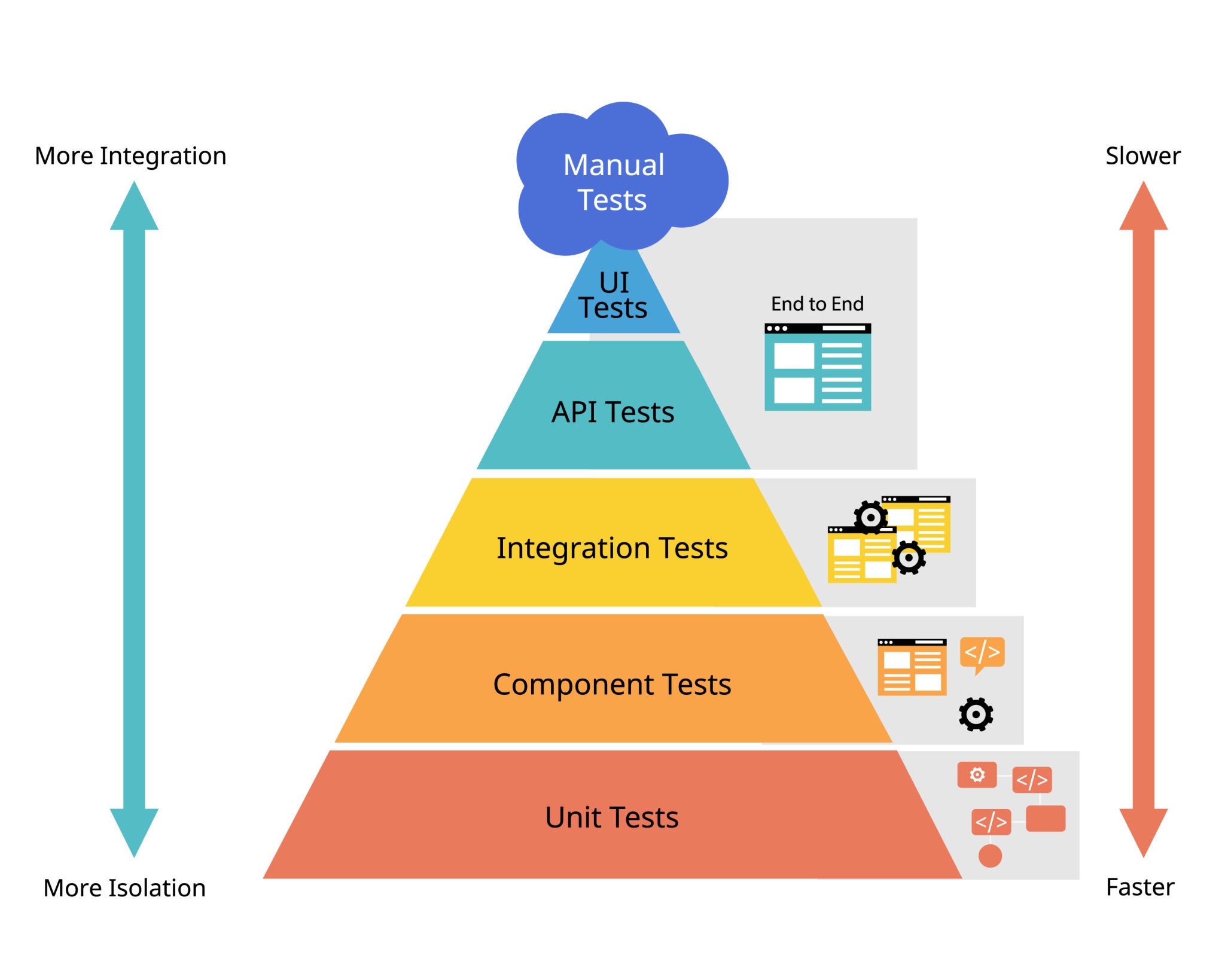
The pyramid has 3 main layers:
Layer 1: Unit Tests (Foundation — write the most) 🧪
- Goal: Test the smallest unit of code (a class or method) in isolation, without DB or other components.
- Focus: Service classes (
...ServiceImpl), where business logic lives.
Layer 2: Integration Tests (Middle — write moderately) 🧩
- Goal: Test interactions between multiple components (Controller → Service → Repository → Database).
- Focus: Controllers and major business workflows.
Layer 3: End-to-End (E2E) Tests (Top — write the least) 🌐
- Goal: Test the entire user flow from UI to backend, simulating real user behavior.
- Focus: Primary user scenarios.
2. Testing Scope for Each Package
a. Should we test Repository and database connection?
No, you don’t need to write separate unit tests for Repository interfaces or database connectivity.
-
Repository: Methods from
JpaRepositoryare already heavily tested by Spring — retesting them is unnecessary. -
Database connectivity: This is a configuration concern. Integration tests will naturally validate it. If your DB config is wrong, your tests will fail instantly — which is exactly what you want.
-
When should you test Repository? Only when you write custom queries using
@Query. In that case, you write an Integration Test, not a unit test.
b. How to test packages like utils, config, and common?
utils — ⭐ Must have Unit Tests
- Why: Utility classes (e.g., SlugGenerator) contain pure logic. A tiny bug here affects the entire app.
- Strategy: Write unit tests covering all input cases (normal text, diacritics, special chars, empty, null).
config — 🧩 Covered via Integration Tests
- Why: Config classes are mostly declarations (
@Bean,@Configuration) and contain no business logic. - Strategy: They are implicitly tested during integration tests. If configuration is wrong, the Application Context fails to initialize.
common — 🧩 Covered via Integration Tests
- Why: Classes like
BaseEntitycontain shared fields and annotations, not complex logic. - Strategy: Their behavior (e.g., auto-filling
createdAt) gets validated through entity-related integration tests.
3. Strategy Summary
-
Prioritize Unit Tests for Service classes: They contain business logic — aim for high coverage here.
-
Use Integration Tests to validate core flows: One integration test per important API ensures end-to-end reliability.
-
Clear separation:
- utils → Unit Test
- config & common → covered by Integration Test
-
Don’t test the framework: Trust Spring Data JPA. No need to test features it already guarantees.
4. New Security Configuration Flow
The updated security architecture follows two core principles: Stateless Authentication (JWT) and Permission-Based Authorization.
The process is split into two main phases:
- Authentication (when the user logs in)
- Authorization (when the user accesses a protected resource)
4.1. Authentication Flow
This flow happens when the user submits an email and password to log in.
Explanation
-
Client → AuthController: User submits login credentials.
-
AuthController → AuthService: Delegates business logic.
-
AuthService → AuthenticationManager: Uses Spring Security to authenticate. Internally calls
CustomUserDetailsServiceto load user & verify password. -
Returns Authentication: If successful, roles & permissions are included.
-
Token generation:
JwtTokenProvidercreates accessTokenRefreshTokenServicecreates & stores refreshToken
-
AuthService → AuthController: Returns both tokens.
-
Controller → Client: Sends 200 OK with tokens.
4.2. Authorization Flow
This happens when the user tries to access a protected endpoint.
:::note EEplain
-
Client sends request with JWT.
-
JwtAuthFilter:- Extracts token
- Validates it
- Loads user details with permissions
- Sets Authentication in
SecurityContextHolder
-
Spring Security intercepts controller call due to
@PreAuthorize. -
Compares required permission (
product:delete) with user’s authorities. -
Outcomes:
- Match → Method runs
- No match →
403 Forbidden
:::